
QC
QC: the inspection's scope, and its two photo counts
What Tomebuy's warehouse checks when an item arrives, what it does not check, and the two different free-photo counts its own pages publish.
What inspection covers
Tomebuy's Inspection Information and Quality Inspection Scope notice describe the check as appearance-only: model, style, size, colour, surface condition and major defects, confirmed against basic product identifiers. A detailed check happens on arrival, and if anything looks wrong, Tomebuy says it notifies you before the item goes into storage.
What is explicitly out of scope: colour variance under different lighting, how an item feels to use, and manufacturer-level specifications. Sealed items, and items that are not garments, bags or shoes, are not opened for inspection. Electronics get an appearance check only; Tomebuy does not power-test them. Items sourced through 1688 are flagged separately as sometimes running to a different quality standard than Taobao or Tmall listings of the same kind of product.
Inspection happens once, on arrival, not again before shipping. If an item sits in storage for weeks before you submit it for freight, the photos you have are still the same arrival-day set; Tomebuy does not re-photograph stored goods immediately before they ship unless you pay for the parcel-photo service covered on Fees.
The photo-count conflict
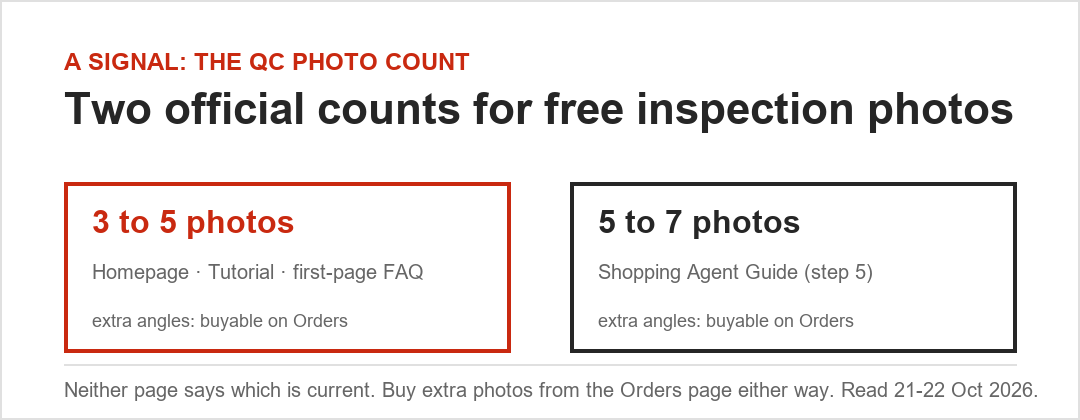
Tomebuy's homepage, its Tutorial page, and its first-page benefit FAQ all say inspection comes with 3 to 5 free photos. Its separate Shopping Agent Guide page, covering the same inspection step, says 5 to 7. Neither page acknowledges the other. This edition prints both rather than guessing which is current; either way, additional pictures or specific angles beyond the free count are purchasable from the Orders page, though Tomebuy keeps that price out of its public pages.
Reading QC photos once they arrive
A short routine for reading the photos once they post to your account:
- Match the colour and model against what you selected at order time, not against the listing's cover photo, which may show a different variant.
- Look for the specific defect types Tomebuy says it checks: surface marks, stitching, obvious damage, and whether the basic identifiers (size tag, model number) match the order.
- Remember what is not shown: fit, feel, or how a fabric behaves under different light. If any of those matter to you, that is a reason to pay for an extra angle rather than assume the standard photos cover it.
- If something looks wrong, use the Orders page contact option before the item is submitted for shipping, not after.
Electronics and sealed items specifically
Two categories get a narrower check than clothing or shoes. Electronics are inspected for visible condition only; Tomebuy does not plug them in, power them on, or test any function before storing them. Sealed items, anything in its original factory packaging, are left sealed, so the inspection confirms the outer packaging and basic identifiers rather than the item inside. If either category matters enough that you want it opened and checked before shipping, say so through the Orders page contact option as soon as the item shows as received, since the standard inspection will not do this by default.
Tomebuy's own Quality Inspection Scope Clarification notice, posted 31 December 2025, restates this same boundary: appearance, colour and major defects are covered; usage experience and manufacturer-level specification are not. See Updates for the notice in full.
If the item doesn't match what you ordered
A mismatch between the order and the inspection photos, wrong colour, wrong size tag, visible damage, falls outside the five-day return window's no-fault case covered on Storage and returns, which is written around returns where there is no quality issue. For a genuine mismatch, raising it through the Orders page as soon as the photos post gives Tomebuy's staff the most room to resolve it before the item moves further down the process, since the agreement itself does not spell out a separate timeline for a quality-fault claim.
Keep the original listing open alongside the inspection photos when you compare them. It is easier to see a genuine mismatch side by side than from memory, especially for colour, where screen and photo lighting can both shift a shade enough to cause a false alarm.
What happens after the clock startsCheck your own storage deadline