
Guide
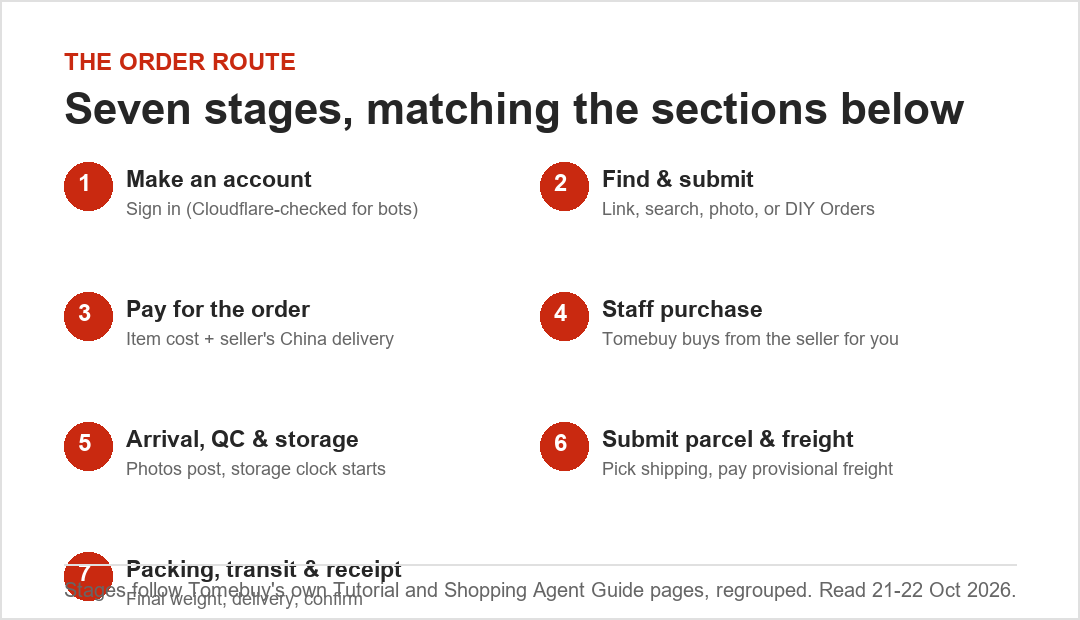
Guide: the order route, account to delivery
Tomebuy publishes a public nine-step written Tutorial, starting with selecting a product. This page regroups those steps into seven stages, built from Tomebuy's own Tutorial and Shopping Agent Guide pages, with a screenshot wherever one was possible to take without an account. Where a screen sits behind the sign-in, an annotated illustration drawn by this site stands in for it, and each one is labelled as a drawing.
Official Tomebuy buying guide — written steps, checked 25 October 2026.
Stage five, arrival and QC, is where free storage starts counting down and where the inspection-photo count matters. If you read nothing else before your first order, read that one.
Stage 1 · Make an account
The sign-in and registration entry sit behind the same page, reached from the user icon in the header. Automated browsers get a Cloudflare check here; a real visitor in a normal browser gets past it and reaches the account form. There is no separate /register.html, so do not look for one.
Once you are in, set up your shipping address and, if you have one, enter an invitation code at registration, which Tomebuy's own help centre says can earn you a shipping coupon.
Stage 2 · Find and submit the item
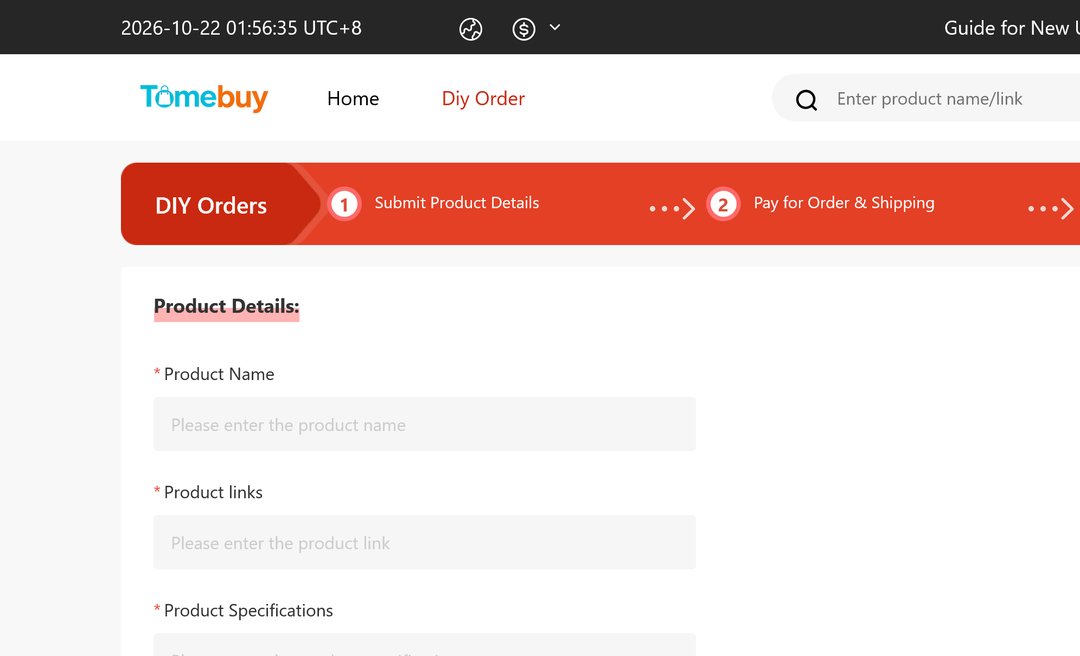
Tomebuy lists four ways to start an order: hand over a product link copied from Taobao, Tmall, 1688 or Weidian, search by name or keyword, search by photo, or use the DIY Orders form for anything else (the help text names Xianyu, Pinduoduo and Yupoo as examples). DIY Orders asks for a product name, a link if you have one, specifications, and an image, then treats the request as a consultation rather than a guaranteed match.
Whichever method you use, the next screen is the same: pick the model, colour, size and quantity, and note any shipping restriction the listing itself flags.
Stage 3 · Pay for the order
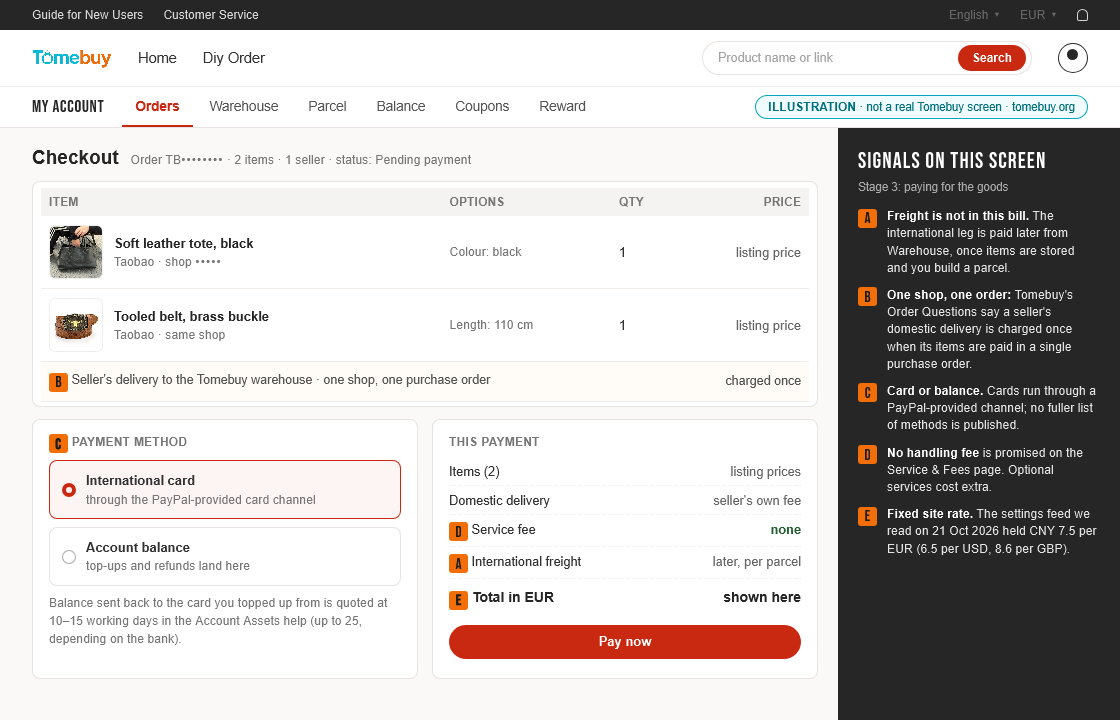
Payment at this stage covers the item itself plus the seller's delivery to Tomebuy's domestic address, not the international leg. Tomebuy's published payment channel is an international credit card routed through PayPal; its help pages do not list a full menu of alternatives. If you already hold account balance from a top-up or a refund, that can cover part or all of this payment before a card is charged.
This screen only exists once you are signed in, so no public screenshot of it exists yet. The field layout is left as an open slot below until one can be captured from a real account. Until then, the picture below is this site's annotated drawing of the checkout, put together from Tomebuy's written help rather than captured.
Stage 4 · Staff buy it on your behalf
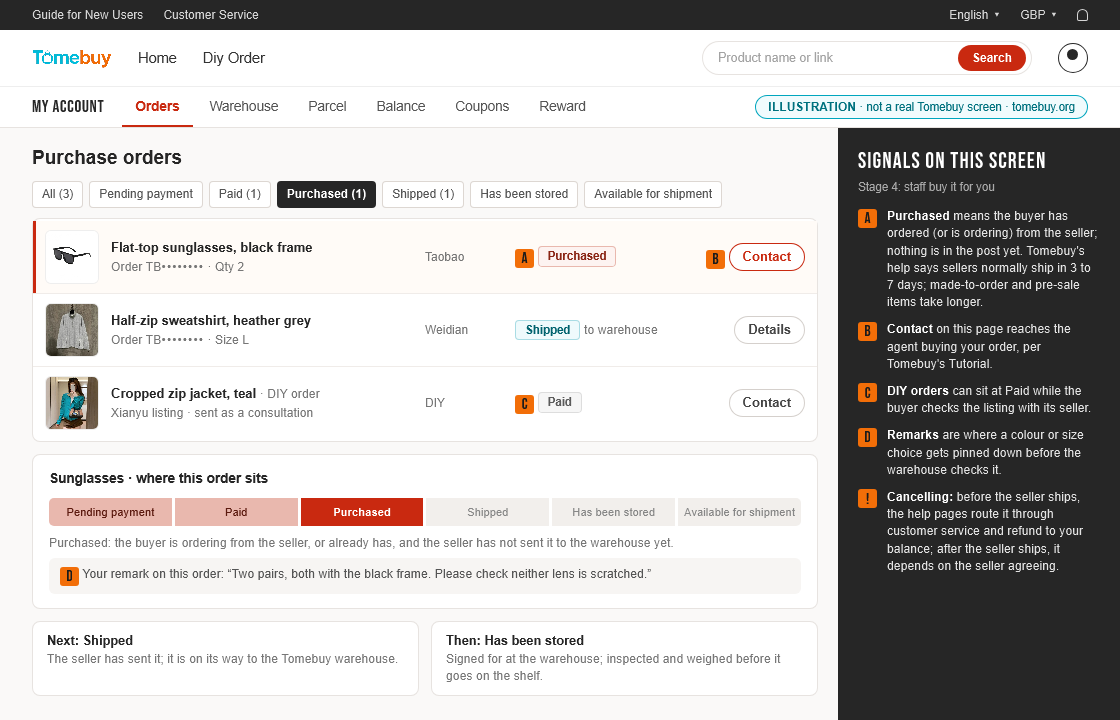
A buyer on Tomebuy's side purchases the item from the seller once payment clears, then has it delivered to Tomebuy's own warehouse. You can follow the order's status on the Orders page during this stage, and a contact button on that page reaches the buyer handling your order if something needs clarifying.
This is also the stage where a DIY Orders request can stall if the seller the request named turns out not to ship the item, or asks for a price Tomebuy's buyer judges unreasonable. Tomebuy's own guide frames DIY Orders as a consultation rather than a guaranteed match for exactly this reason, so a status that sits unchanged here for longer than a standard link-based order is not necessarily a fault, just a slower negotiation.
Stage 5 · Arrival, inspection and storage
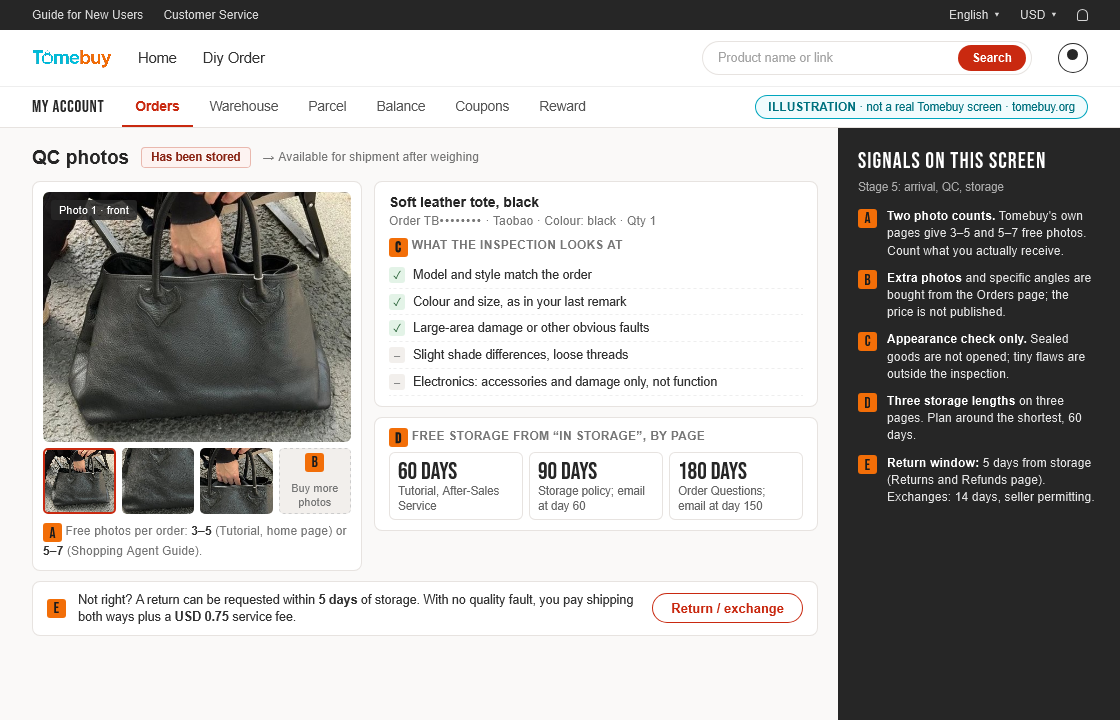
Once the item reaches the warehouse, Tomebuy inspects it for appearance (model, style, size) and photographs it. This is also where the free-storage clock starts, and where the two biggest conflicts in Tomebuy's own documentation show up: the photo count and the storage length.
QC covers what the inspection does and does not check, and Storage and returns covers the three-way storage conflict in full, including what counts as abandoned and when.
Practically, this is the stage to slow down at rather than rush through. The photos that post here are the only inspection record the order gets, the storage clock that starts here determines how much time is available for every stage after it, and the five-day return window, if one ends up being needed, is counted from the same “in storage” moment.
Stage 6 · Ship it: pick a method, pay freight
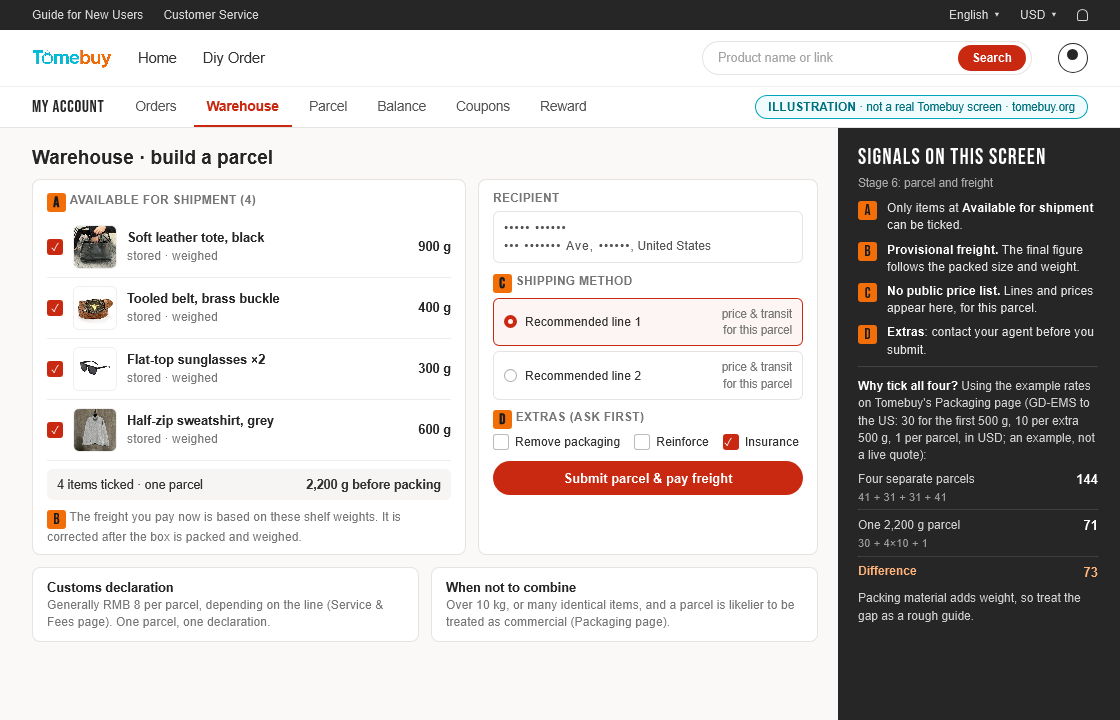
From the Warehouse page you choose which stored items to ship, enter a recipient, and pick a shipping method. Items can go out separately or combined into one parcel; Tomebuy's own help pages recommend combining where possible because the saving can be substantial. The freight quote at this stage is provisional: it is based on the item weight already on file, and gets corrected once the parcel is physically packed.
The consolidation calculator replays Tomebuy's own combined-versus-separate example if you want to see the saving before you submit anything.
Some stored items may be restricted from combining with others, flagged by Tomebuy's own shipping-restriction checks at this stage rather than earlier. If an item you expected to ship with the rest of a parcel is missing from the eligible list, that is usually why, and splitting it into its own parcel is the normal fix.
Stage 7 · Packing, the international leg, and confirming receipt
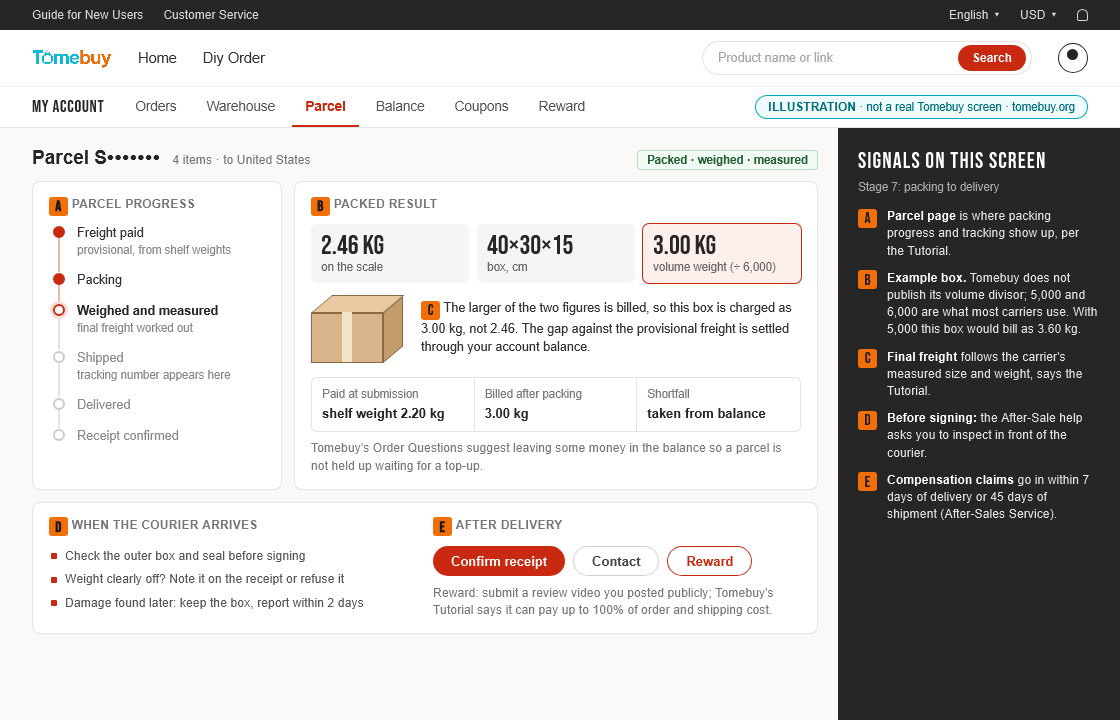
Once freight clears, warehouse staff pack the box, put it on a scale, and measure its dimensions. Whichever is bigger, the scale weight or the volume-based figure, becomes what you are actually billed. Any difference between the provisional and final charge is refunded to or deducted from your account balance. The parcel then ships internationally; once it arrives, you confirm receipt from the Parcel page, which is also where after-sales requests start if something is wrong.
International shipping carries its own risks that sit outside Tomebuy's control once a parcel leaves the warehouse: customs delay, confiscation, damage in transit, or outright loss. Tomebuy's own pages are direct about this rather than promising otherwise, and the optional insurance covered on Storage and returns is the main way to offset it. Confirming receipt promptly once a parcel does arrive matters too: it is what closes the order and starts the five-day return window if anything needs to go back.
What you pay, stage by stageShipping, customs and consolidation in detail